AES加密、解密类

<?php
/**
 * Desc: AES加密解密
 * User: SenSen Wechat:1050575278
 * Date: 2021/4/27
 * Time: 14:14
 */

namespace sensen\services;

class AesService
{
    protected static $method = "AES-128-CBC";
    const KEY = 'fei1zui2you3jie!';
    const IV = 'hello202105world';

    /**
     * 加密
     * @param string|array $data 待加密
     * @param string $key 秘钥
     * @param string $iv 偏移量
     * @return string|string[]|array
     */
    public static function encrypt($data, $key=self::KEY, $iv=self::IV)
    {
        if(is_array($data)){
            $res = [];
            foreach ($data as $v){
                $text = openssl_encrypt($v, static::$method, $key, OPENSSL_RAW_DATA, $iv);
                $res[] = self::safetyBase64Encode($iv . $text);
            }
        }else{
            $text = openssl_encrypt($data, static::$method, $key, OPENSSL_RAW_DATA, $iv);
            $res = self::safetyBase64Encode($iv . $text);
        }
        return $res;
    }

    /**
     * 解密
     * @param string|array $text 待解密
     * @param string $key 秘钥
     * @param string $iv 偏移量
     * @param false $login 是否为登录
     * @return false|string|array
     */
    public static function decrypt($text, $key=self::KEY, $iv=self::IV, $login=false) {
        if(is_array($text)){
            $data = [];
            foreach ($text as $v){
                $cipherText = self::safetyBase64Decode($v);
                $cipherText = substr($cipherText, strlen($iv));
                $data[] = openssl_decrypt($cipherText, static::$method, $key, OPENSSL_RAW_DATA, $iv);
            }
        }else{
            $cipherText = self::safetyBase64Decode($text);
            if($login){
                //仅方便登录使用,登录时iv与key相同
                $data = openssl_decrypt(base64_decode($text), static::$method, $key, OPENSSL_RAW_DATA, $iv);
            }else{
                $cipherText = substr($cipherText, strlen($iv));
                $data = openssl_decrypt($cipherText, static::$method, $key, OPENSSL_RAW_DATA, $iv);
            }
        }

        return $data;
    }

    /**
     * base64安全编码
     * @param string $text
     * @return string|string[]
     */
    public static function safetyBase64Encode($text)
    {
        $text = base64_encode($text);
        $text = str_replace(['+','/'],['-','_'],$text);
        return $text;
    }

    /**
     * base64安全解码
     * @param string $text
     * @return false|string
     */
    public static function safetyBase64Decode($text)
    {
        $text = str_replace(['-','_'],['+','/'],$text);
        $text = base64_decode($text);
        return $text;
    }

}

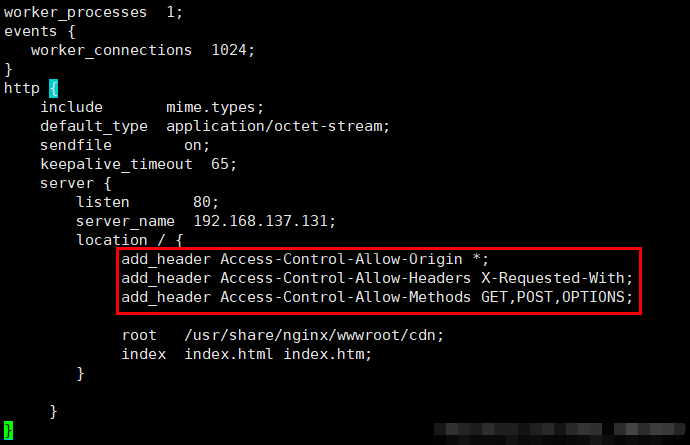
加载字体跨域问题

apache

具体步骤如下:
1.开启apache的mod_headers模块
LoadModule headers_module modules/mod_headers.so

2.设置Access-Control-Allow-Origin


Header set Access-Control-Allow-Origin "*"

nginx

微信截图_20210407111855.png

字体转base64并替换原引用

字体转base64编码网址:https://transfonter.org/

ThinkPHP6 二级目录安装

由于某些特殊原因,可能需要将thinkphp系统安装到二级目录中,可参考以下操作(仅供参考):

网站目录:/www/wwwroot/website
运行目录:/subdir/public

伪静态:

location ~ .*\.(txt|TXT|gif|GIF|jpg|JPG|jpeg|JPEG|png|PNG|bmp|BMP|swf|SWF|css|CSS|js|JS|ico|ICO|doc|DOC|xls|XLS|xlsx|XLSX|docx|DOCX|json|JSON|woff2|WOFF2|woff|WOFF|ttf|TTF|pdf|PDF|zip|ZIP|rar|RAR|7z|7Z|svg|cur|map|properties|bcmap|htm|gz|log)$
{
  
  valid_referers xxx.cn *.yyy.cn;
  if ($invalid_referer){
     return 404;
  }
  
  rewrite  ^/subdir/(.*)$  /$1  last;   break;
  
}

set $flag "";
location  /subdir/ {
  index index.php;

  if ($request_uri ~* (get_file|get_auth_file|download|auth_download)){
    set $flag "${flag}1";
  }
  if ($http_referer !~* (xxx|yyy)){
    set $flag "${flag}1";
  }
  if ($flag = '11'){
    return 404;
  }
  
  if (!-e $request_filename){
    rewrite  ^/subdir/(.*)$  /index.php?s=$1  last;   break;
  }
}

Nginx配置:root /www/wwwroot/website/subdir/public;

ThinkPHP源码修改以支持二级目录访问

  1. 修改helper.phpurl方法默认domain参数为:true
  2. 修改Url.phpparseDomain方法返回值为:return $scheme . $domain .'/subdir'

Route::buildUrl($data['avatar'])->suffix(false)->domain(true)->build();

短信验证码安全验收标准

作为用户,我可以通过手机号和短信验证码登录,以便于更方便的登录。

安全验收标准:

  • 短信验证码有效期 2 分钟
  • 验证码为 6 位纯数字
  • 每个手机号 60 秒内只能发送一次短信验证码,且这一规则的校验必须在服务器端执行
  • 同一个手机号在同一时间内可以有多个有效的短信验证码
  • 保存于服务器端的验证码,至多可被使用 3 次(无论和请求中的验证码是否匹配),随后立即作废,以防止暴力攻击
  • 短信验证码不可直接记录到日志文件
  • 如登陆场景则需判断手机号是否已注册
  • (建议)发送短信验证码之前,先验证图形验证码是否正确
  • (可选)集成第三方 API 做登录保护(服务器在处理登录请求的时候,尽可能多的收集该请求的上下文信息,例如登录请求的来源IP地址,时间,手机号,User-Agent等等数据,并且把这些数据传递给第三方API,由他们进行一次分析判断,并把结果返回给服务器,告诉服务器当前请求者是可信用户还是可疑用户)
  • 应该可以通过配置白名单的方式,只向特定手机号码发送验证码,以免在非生产环境测试时发生打扰真实用户的事故
  • 应该可以通过配置 By Pass 的方式,在特定环境禁用短信验证码发送,并总是验证通过,以便在非生产环境节约短信配额
  • APP可以直接走移动供应商手机验证

使用gitolite搭建git服务器并自定义仓库目录

官网:https://gitolite.com/gitolite/index.html

安装:
su - git
mkdir -p ~/bin
git clone https://github.com/sitaramc/gitolite
gitolite/install -ln ~/bin # please use absolute path here
gitolite setup -pk yourname.pub

其中yourname.pub为管理员git公钥。git 跟 gitolite 服务器通信用的是 git 这个真正的系统用户,而 gitolite 控制仓库权限则是使用自己的虚拟用户。这里的 yourname 就是虚拟用户。

gitolite提供了一个 gitolite-shell。当你使用 ssh 访问 gitolite 时 ssh 服务会启动 gitolite-shell。这个脚本会检查当前用户是否有权限访问对应的仓库。如果用户通过 git push 修改了仓库内容,则会触发 gitolite 预先配置 git hook,这些 hook 会执行创建仓库、添加用户之类的操作。

下载主仓库:
git clone git@yourhost:gitolite-admin.git

通过对主仓库配置及公钥进行管理即可。

Gitolite自定义仓库目录
home/git/.gitolite.rc文件新增以下代码,并重新安装一次即可。

#sensen
GL_REPO_BASE    => "/diskb/git/repositories",


账户余额提现逻辑设计

后端逻辑

1.参数检验:银行卡号(必传)、交易密码(必传)、提现金额(必传)、用户ID(必传),TOKEN值(必传)。注意事项:提现金额禁止科学计数法,并且不能为0、为负。

2.判断提现时间是否在可提现时间段(例如8:00至18:00)。

3.旧版本禁止提现(可以变相强制用户更新)。

4.控制提现金额(最小提现金额和最大提现金额)。

5.获取手续费(最低手续费和最高手续费,可根据设置取值)。

事务处理

6.查找用户余额,判断余额是否满足提现金额。

7.更新用户余额字段,扣除提现金额。

8.增加提现记录表字段(提现日志)。

9.发送系统消息。

10.财务审核通过或拒绝,拒绝则退回金额。

11.手动转账或调用第三方支付。

12.记录转账凭证等。

wamp 配置多端口虚拟主机

应用场景:如局域网内访问wamp下的指定网站

修改httpd.conf新增端口,如:

#新增8080端口
Listen 0.0.0.0:8080
Listen [::0]:8080

配置虚拟主机,httpd-vhost.conf

<VirtualHost *:8080>
    ServerName www.test.com
    DocumentRoot "e:/wamp/www/test/public"
    <Directory  "e:/wamp/www/test/public/">
        Options +Indexes +Includes +FollowSymLinks +MultiViews
        AllowOverride All
        Require all granted
    </Directory>
</VirtualHost>

此时局域网其他电脑即可通过IP:8080获取网站接口数据了